Four.meme Bundler Guide: Create Tokens & Bundle Buy (No Code)

Launching a token on Four.meme is straightforward, but preparing everything around the launch can quickly become time-consuming. Besides creating the token itself, many projects also need to prepare wallet addresses, upload project information, configure trading tax, and organize multiple accounts before going live.
Instead of switching between different tools, CiaoTool Four.meme Bundler brings the entire workflow into one place. From entering your token information to importing multiple wallets and configuring optional trading tax, everything can be completed through a simple no-code interface.
In this guide, you'll learn what Four.meme Bundler is, how it works, and how to use every feature available in CiaoTool.
Fourmeme Bundler Video Tutorial
What is Four.meme Bundler?
Four.meme Bundler is a no-code token launch tool built for the Four.meme platform on BNB Chain. It lets you create a token, configure your project, import multiple wallets, and complete the launch process from one interface.
Instead of switching between different tools, CiaoTool simplifies the entire workflow into a few guided steps. Whether you're launching your first meme coin or managing multiple projects, Four.meme Bundler helps make the process faster and easier to manage.
How to Use Four.meme Bundler
Using CiaoTool Four.meme Bundler only takes a few minutes. After preparing your project information and wallets, follow the steps below to complete your token launch.
Step 1 — Connect Your Wallet

Connect a wallet that supports the BNB Chain network and open the Four.meme Bundler page. Once connected, you'll be able to configure your token and begin the launch process.
Step 2 — Enter Your Token Information
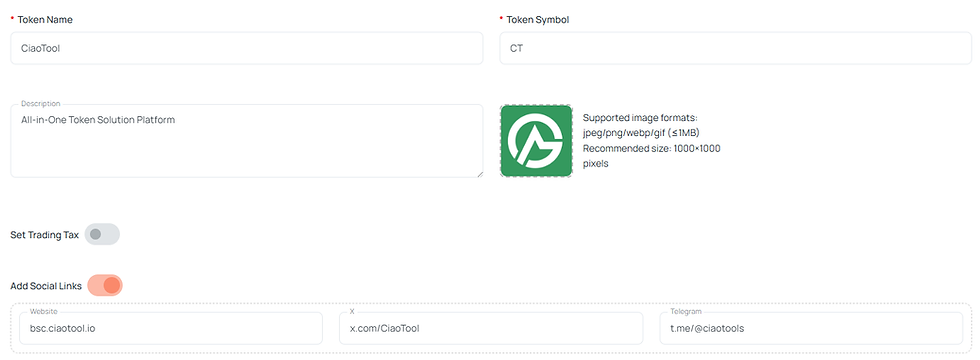
Fill in your token name, symbol, logo, and optional project details such as your website, X account, and Telegram.
You can also choose a project category and configure optional trading tax settings if needed.
Step 3 — Configure Your Wallets


Import your developer wallet and the wallets you'll use during the launch.
CiaoTool supports both manual private key input and Excel import, allowing you to manage up to 20 wallets in one workflow.
Step 4 — Set Buy Amounts
Enter the amount for each wallet.
If you use MAX, CiaoTool automatically reserves a small amount of BNB for network gas fees, although you can adjust the amount manually before confirming.
Step 5 — Create Your Token
Review all settings one final time, then click Create Token & Buy.
CiaoTool will handle the remaining steps automatically, allowing you to complete your token launch from a single interface.
Why Use CiaoTool Four.meme Bundler?
Launching a token involves more than simply deploying a contract. Preparing project information, configuring wallets, and reviewing launch settings manually can quickly become repetitive, especially if you're managing multiple projects.
CiaoTool Four.meme Bundler brings these tasks together into a single no-code workflow, helping you complete the entire setup from one interface.
Some of the key advantages include:
No-code token launch – Create a Four.meme token without writing smart contracts.
Support for multiple wallets – Import up to 20 wallets using manual input or an Excel template.
Trading tax configuration – Configure optional marketing, burn, dividend, and LP fees before launch.
Developer-friendly workflow – Manage token information, wallets, and launch settings in one place.
Support for all official quote token markets – Easily switch between supported Four.meme quote token pages based on your preferred market.
Whether you're launching your first meme coin or managing multiple launches, CiaoTool helps simplify the entire process while reducing repetitive manual work.
FAQ
Is Four.meme Bundler beginner-friendly?
Yes. CiaoTool is designed with a graphical interface, so you can create a token and complete the launch process without writing any smart contract code.
How many wallets can I import?
You can import up to 20 wallets. Wallets can be added manually or imported using the provided Excel template.
Which quote token markets are supported?
CiaoTool currently supports all official Four.meme quote token markets, including BNB, USD1, and UUSD. Simply switch to the corresponding token page before starting your launch.
Does Four.meme Bundler support trading tax?
Yes. You can optionally configure marketing fees, burn fees, dividend fees, LP fees, and dividend thresholds. These settings become effective after the token migrates to a supported DEX.
Conclusion
Launching a token on Four.meme doesn't have to involve multiple tools or a complicated workflow.
With CiaoTool Four.meme Bundler, you can configure your project, manage multiple wallets, customize token settings, and complete the launch process through a single no-code interface.
If you're planning to launch your next meme coin on Four.meme, CiaoTool provides an efficient way to prepare and manage every step of the process.
Ready to launch your token on Four.meme?
Create your token, configure your project, and manage up to 20 wallets with CiaoTool Four.meme Bundler.
👉 Launch on Four.meme Now
Comments