How to Create a Token on BSC

Updated: May 7
Create your own token on the BNB Smart Chain in just one click. This tutorial covers wallet connection, parameter setup, and feature configuration.
CiaoTool makes token creation faster, cheaper, and smarter — your go-to tool for launching tokens on BSC.

1. Introduction: The Era of One-Click Token Creation
BSC, short for BNB Smart Chain, is a Layer 1 blockchain initiated by Binance that’s fully compatible with the Ethereum Virtual Machine (EVM).
Its biggest advantages are low transaction fees, fast confirmation speed, and a mature ecosystem — making it one of the most popular public chains after Ethereum.
In the past, “token creation” was considered a developer’s privilege.If you didn’t know how to code in Solidity, you were locked out of the process.But now, tools like CiaoTool have completely lowered that barrier — allowing anyone to create and manage blockchain tokens with just a few clicks.
CiaoTool is a powerful, no-code, all-in-one token management suite.With it, you can create your own BSC token, customize its behavior, and manage post-launch operations without writing a single line of code.
2. What is CiaoTool?
CiaoTool is a multi-chain token creation and management platform built by CiaoLab, designed to make blockchain token deployment accessible to everyone — not just developers.

With CiaoTool, you can:
Create BEP-20 tokens on BSC in minutes
Send airdrops and batch transfers
Token Bunder on Fourmeme or others launchpads
Multi-addresses bundled Buy / Sell
Everything from token generation to liquidity and market management can be done in one dashboard — fast, secure, and affordable.
3. How to Create a Token on BSC
Here’s the complete step-by-step guide — applicable for both desktop and mobile users 👇
Step 1: Preparation
1️⃣ Install a Wallet Plugin — We recommend MetaMask.
2️⃣ Switch Network — Choose “BNB Smart Chain” in your MetaMask settings.
3️⃣ Deposit BNB — Make sure your wallet has enough BNB to cover gas fees.
Step 2: Visit CiaoTool
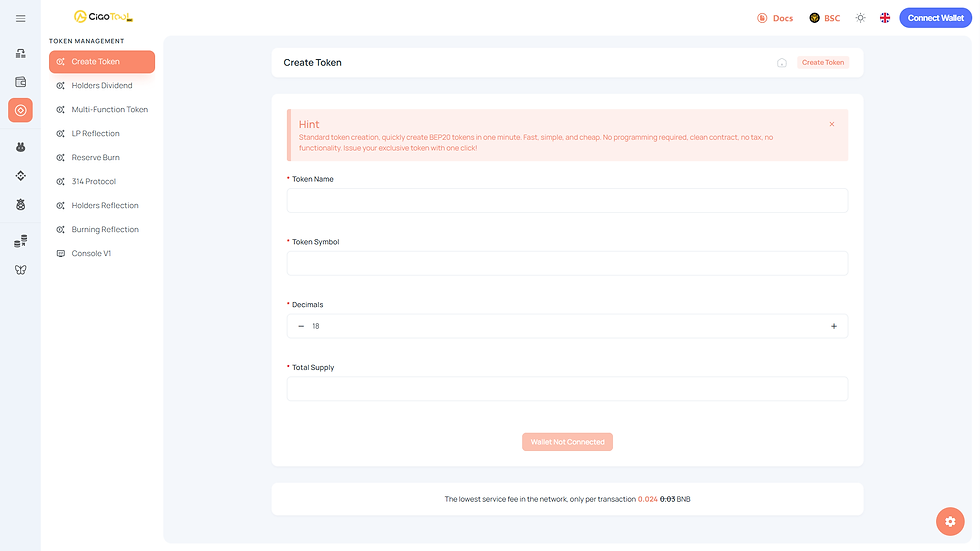
Click “Connect Wallet” in the upper-right corner and select MetaMask.
After connecting, open the Token Management section and click “Create Token.”
Step 3: Fill in Token Details
The CiaoTool interface is simple and beginner-friendly — just fill in the following fields:
Token Name: e.g., “DogKing”
Symbol: e.g., “DK”
Total Supply: e.g., 100,000,000
Decimals: usually 18
Once confirmed, click “Create”, approve the transaction in your wallet, and within seconds your token will be deployed to the BSC blockchain.
Step 4: Verify & Deploy
Once your token is successfully deployed, you’ll receive an on-chain contract address.You can:
Verify and publish your contract on BscScan
Upload your token logo, website, and social links
Add your token pair and liquidity on PancakeSwap, At this stage, your token is live on BSC — ready to be traded by anyone globally.
Step 5: Mobile Token Creation
Prefer to operate from your phone? No problem.
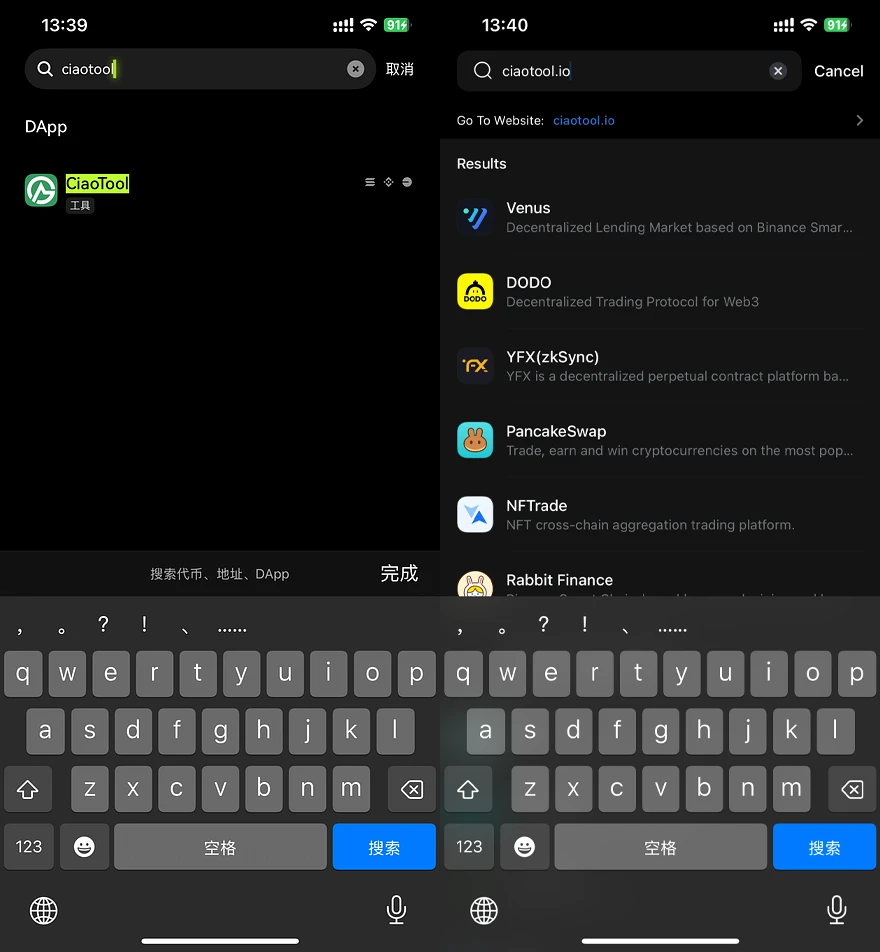
Using TP Wallet or OKX Web3 Wallet
1️⃣ Go to the Discover / DApp section
2️⃣ Type in “ciaotool.io”
3️⃣ Connect your wallet and follow the same steps as the desktop guide
Within a minute, your token will be created directly from your phone.
4. What Comes After Launch
CiaoTool is more than just a launchpad — it’s a complete post-deployment management system.
You can continue to:
🪂 Send Airdrops / Batch Transfers — Distribute tokens to thousands of addresses efficiently
📈 Manage Market Activity — Use liquidity tools to maintain token exposure and volume
🪙 Perform Bundle Trades & Cold Swaps — Reorganize holdings securely and discreetly
From creation → distribution → liquidity → growth, every process can be handled within the same ecosystem.
5. Conclusion: Token Creation is Just the Beginning
As you can see, launching a token on BSC with CiaoTool is simple, fast, and code-free.All you need is a wallet and a small amount of BNB.
But remember — launching is only the first step.
The real success of a token lies in how you build your community, manage liquidity, and drive long-term engagement.
CiaoTool empowers every creator to turn ideas into assets, and communities into ecosystems.
Token creation is no longer a developer’s privilege — it’s your opportunity.
FAQ
How do I create a token on BSC without coding?
You can create a token on BSC without coding by using a no-code platform like CiaoTool.
Simply connect your wallet (such as MetaMask), set your token parameters (name, symbol, supply, decimals), and confirm the transaction. The platform automatically deploys a BEP-20 smart contract to the BNB Smart Chain.
What is a BEP-20 token on BSC?
A BEP-20 token is the standard token format used on BNB Smart Chain.
It is fully compatible with the Ethereum ERC-20 standard, meaning it can interact with EVM-based tools, wallets, and decentralized exchanges like PancakeSwap.
When you create a token on BSC, you are deploying a BEP-20 smart contract.
How much does it cost to create a token on BNB Smart Chain?
The cost of BSC token creation mainly depends on:
Gas fees (paid in BNB)
Optional advanced features (if selected)
Compared to Ethereum, BNB Smart Chain offers significantly lower transaction costs, often under a few dollars depending on network congestion.
Comments